• Church Email

Church email that works with your texts

Send, schedule, and automate email to your whole church or one first-time guest, from the same place you text. Every plan includes unlimited email.

Unlimited Email
on Every Plan

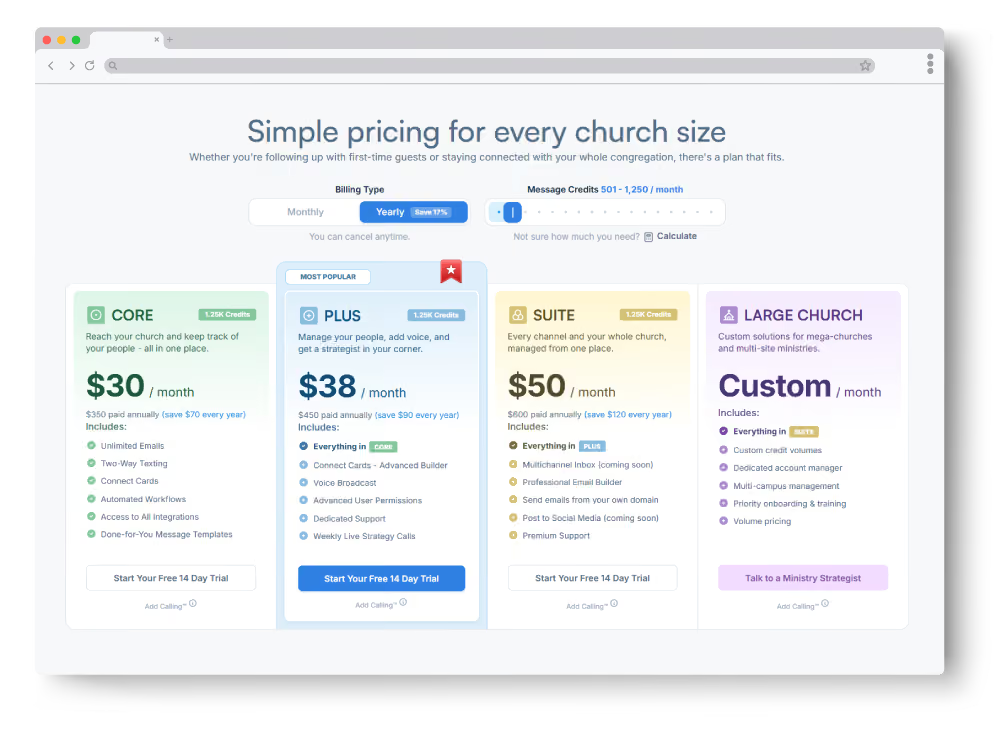
Core, Plus, and Suite all include unlimited email sends. Email your whole congregation every week, or one guest at a time, without counting sends.

Compare Plans
Some church communication tools cap email on their lower plans. We don't.
Text In Church pricing plans: Core, Plus, Suite and Large Church

Everything Your Church Needs to Text Well

Schedule ahead

Write it Tuesday, send it Saturday. Scheduled emails wait in your Pending folder, where you can edit or delete them.

Send to the right people

One person, a specific group, or your whole church.

Make it personal

Choose a Personal or Plain Text template, add images, and set the name and reply-to address your people see.

Automate follow-up

Use email steps in Automated Workflows, right next to your texts.

Start with templates

Done-for-you email templates help you
get going fast.

See who opened

Check which people opened each
email in your Sent tab.

See Suite Pricing
Already use Mailchimp? Every plan connects with Mailchimp, so your lists stay in sync.

See How Easy It Is
To Send An Email

Take a quick tour of scheduling an email to a group.

How Churches Use Email
with Text In Church

Frequently asked questions

Is email really unlimited on every plan?

Yes. Core, Plus, and Suite all include unlimited email sends.

Do emails use message credits?

No. Message credits cover texts and voice broadcasts. Sending email doesn't use credits.

Can I text and email the same group?

Yes. Your groups work for both, so you can text a group and email that same group from one place.

Can I use email in Automated Workflows?

Yes. Workflows can include email steps alongside texts, so your guest follow-up runs on its own.

Where do replies go?

You choose the reply-to address for each email, and replies go straight to that inbox. On Suite, if your reply-to address is a church inbox you've forwarded into Text In Church, replies show up in Text In Church too.

Can I see who opened my email?

Yes. Each email in your Sent tab shows who opened it. Open counts are an estimate, since every email provider counts a read a little differently. Email reports don't track clicks, but if you add a Text In Church short link to your email, you can see clicks on that link.

Which plan includes the Professional Email Builder?

Suite and Large Church plans.

Can I send email from my church's own domain?

Yes, on Suite and Large Church plans.

Who can see emails in a forwarded church inbox?

Everyone on your account with access to messaging can see it. That's why we recommend forwarding a general address, like info@yourchurch.com, and not a personal address or one that receives prayer requests, counseling notes, or other private email.

Can we keep using Mailchimp?

Yes. Every plan connects with Mailchimp, so your lists stay in sync. On Suite, you can also design newsletter-style emails right in Text In Church. Our email reports show who opened each email but don't track clicks, so if you rely on click reports, keeping Mailchimp for those emails makes sense.

Ready to Send
Your First Email?

Start your free trial and send your first email today.